
TL;DR — Crawl Budget Optimization Checklist
Quick wins for sites struggling with indexing or slow content discovery:
- Block low-value pages— Use robots.txt to prevent crawling of filters, internal search, and admin pages
- Fix duplicate content— Implement canonical tags and consolidate similar URLs
- Eliminate soft 404s— Return proper 404/410 status codes for removed pages
- Optimize sitemap— Include only indexable URLs with accurate
<lastmod>dates - Reduce redirect chains— Keep redirects to 1-2 hops maximum
- Improve server speed— Faster responses = more pages crawled per session
- Monitor crawl stats— Use Google Search Console to identify bottlenecks
- Handle URL parameters— Block or canonicalize tracking and sorting parameters
Crawl Budget Impact by Issue (Quick Reference)
| Issue | Budget Impact | Priority | Fix Complexity |
| Duplicate content | Critical | P0 | Medium |
| Soft 404 errors | Critical | P0 | Low |
| Infinite URL spaces | Critical | P0 | Medium |
| Long redirect chains | High | P1 | Low |
| Slow server response | High | P1 | Medium |
| Uncompressed resources | Medium | P2 | Low |
| Unnecessary URL parameters | High | P1 | Medium |
| Missing sitemap | Medium | P2 | Low |
Who this guide is for:SEO managers, technical SEOs, and web developers managing large websites (10K+ pages) who need to ensure efficient Googlebot crawling, faster indexing of new content, and elimination of crawl waste. Includes production-ready configurations and real-world case studies.
Quick Start: Fix Crawl Budget in 20 Minutes
Fast track for sites with obvious crawl issues
Step 1: Diagnose Your Current Crawl Health (5 minutes)
# Check your robots.txt accessibility
curl -I https://yoursite.com/robots.txt
# Verify sitemap accessibility
curl -s https://yoursite.com/sitemap.xml | head -50
# Check for redirect chains (should be 1-2 hops max)
curl -IL https://yoursite.com/old-page 2>&1 | grep -i "location:"
In Google Search Console:
- Go to Settings → Crawl Stats
- Check Crawl Requeststrend (declining = problem)
- Review Crawl responsesfor 4xx/5xx errors
- Examine Average response time(target: <500ms)
Step 2: Implement Priority Fixes (10 minutes)
Fix 1: Block low-value URL patterns
# robots.txt - Add these common blocks
User-agent: *
Disallow: /search/
Disallow: /filter/
Disallow: /*?sort=
Disallow: /*?page=
Disallow: /*&utm_
Disallow: /cart/
Disallow: /checkout/
Disallow: /account/
Disallow: /admin/
Disallow: /api/
Disallow: /wp-admin/
Disallow: /tag/*/page/
# Keep CSS/JS accessible for rendering
Allow: /wp-content/themes/
Allow: /wp-includes/
Sitemap: https://yoursite.com/sitemap.xml
Fix 2: Add canonical tags to all pages
<!-- In <head> of every page -->
<link rel="canonical" href="https://yoursite.com/current-page/" />
Fix 3: Return proper status codes
# .htaccess - Fix soft 404s
# Redirect removed products to category
RedirectMatch 301 ^/products/discontinued-(.*)$ /products/
# Return 410 Gone for permanently removed content
RedirectMatch 410 ^/old-blog/(.*)$
Step 3: Validate Changes (5 minutes)
# Test robots.txt parsing
curl "https://www.google.com/webmasters/tools/robots-testing-tool?siteUrl=https://yoursite.com"
# Verify canonical implementation
curl -s https://yoursite.com/page | grep -i "canonical"
# Check status codes
curl -I https://yoursite.com/removed-page
Table of Contents
- What is Crawl Budget?
- Crawl Budget Components: Capacity vs. Demand
- When Crawl Budget Actually Matters
- Diagnosing Crawl Budget Issues
- Robots.txt Optimization Strategies
- Sitemap Best Practices
- Handling Duplicate Content
- URL Parameter Management
- Server Performance Optimization
- Faceted Navigation Solutions
- Crawl Budget for JavaScript Frameworks
- Monitoring and Measurement
- Orphan Pages Detection Script ⭐ NEW
- GSC API Automation ⭐ NEW
- Advanced Strategies for Large Sites
- Common Myths Debunked
- Crawl Budget Audit Checklist
- Tools and Resources
- FAQs
1. What is Crawl Budget?
Crawl budgetis the amount of time and resources Google devotes to crawling your website. It determines how many pages Googlebot will crawl during each visit and how frequently it returns.
“The web is a nearly infinite space, exceeding Google’s ability to explore and index every available URL. As a result, there are limits to how much time Google’s crawlers can spend crawling any single site, where a site is defined by the hostname.” — Google Search Central Documentation(Updated December 19, 2025)
Important clarification:Google defines crawl budget per hostname. This means www.example.com and shop.example.com have separate crawl budgets.
The Critical Distinction: Crawling vs. Indexing
Important:Not everything crawled gets indexed. Each page must be:
- Crawled— Googlebot fetches the page
- Evaluated— Content quality and relevance assessed
- Consolidated— Duplicate detection and canonicalization
- Indexed— Added to Google’s index (if deemed worthy)
Optimizing crawl budget ensures Google spends its limited crawling resources on your most valuable pages.
Who Should Care About Crawl Budget?
| Site Type | Page Count | Crawl Budget Priority |
|---|---|---|
| Small blogs | <1,000 pages | Low (Google handles it) |
| Medium business sites | 1K-10K pages | Medium (optimize basics) |
| Large ecommerce | 10K-100K pages | High (critical focus) |
| Enterprise/News | 100K+ pages | Critical (constant monitoring) |
Rule of thumb:If your site has more than 10,000 URLs or generates new content faster than Google indexes it, crawl budget optimization is essential.
2. Crawl Budget Components: Capacity vs. Demand
Google defines crawl budget through two main elements:
Crawl Capacity Limit
The maximum number of simultaneous connections Googlebot uses to crawl your site, determined by:
- Server health— Response times and error rates
- Crawl rate settings— Configurable in Search Console
- Google’s infrastructure— Available Googlebot instances
Crawl Capacity = Server Capacity × Googlebot Availability × Error Rate Factor
Crawl Demand
How much Google wantsto crawl your site, influenced by:
- Popularity— More popular URLs get crawled more often
- Staleness— How frequently content changes
- Site events— Migrations, redesigns trigger increased crawl demand
- Perceived inventory— Without guidance, Google tries to crawl all known URLs (the factor you control most)
AdsBot Special Case:Each crawler has its own demand. AdsBot generally has higher demand for sites running dynamic ad targets, and Google Shopping has higher demand for products in merchant feeds.

The Crawl Budget Formula
Crawl Budget = min(Crawl Capacity Limit, Crawl Demand)
Key insight:Even if your server can handle more crawling, Google won’t crawl more than it needs. Conversely, if demand is high but your server is slow, crawling gets throttled.
Crawl Budget Distribution Example
For a 100,000-page ecommerce site:
| URL Type | Page Count | Crawl Priority | Actual Crawls/Month |
| Product pages | 50,000 | High | 45,000 |
| Category pages | 500 | High | 2,500 |
| Filter combinations | 40,000 | Low (blocked) | 0 |
| Blog posts | 1,000 | Medium | 800 |
| Static pages | 100 | Low | 50 |
| Duplicates/Junk | 8,400 | Waste | 5,000 ❌ |
Goal:Eliminate the 5,000 wasted crawls on junk URLs and redirect them to valuable content.
Case Study: E-commerce Site Reduces Crawl Waste by 73%
Background:A mid-size e-commerce site with 85,000 product pages was experiencing severe indexing delays. New products took 3-4 weeks to appear in search results, costing an estimated $50K/month in lost organic revenue.
Diagnosis:
- 340,000 filter URLs being crawled monthly (faceted navigation)
- 45% of Googlebot requests went to parameter URLs
- Sitemap included 12,000 out-of-stock products
- Average server response: 1.2 seconds
Optimization Actions:
| Action | Implementation | Timeline |
| robots.txt update | Blocked filter patterns | Week 1 |
| Sitemap cleanup | Removed OOS products | Week 1 |
| Server optimization | CDN + caching | Week 2 |
| Canonical implementation | 85,000 pages | Week 3 |
Results After 90 Days:
| Metric | Before | After | Improvement |
| Crawl waste | 45% | 12% | -73% |
| Avg response time | 1,200ms | 340ms | -72% |
| New product indexing | 21 days | 4 days | -81% |
| Indexed products | 62,000 | 78,000 | +26% |
| Organic traffic | 125K/mo | 198K/mo | +58% |
ROI:The $15K investment in technical SEO optimization generated an additional $125K/month in organic revenue within 90 days—a 733% ROI.
AI Image Prompt: Split comparison infographic showing crawl budget distribution pie charts. Left side “Before” shows 45% waste in red, 55% valuable in green. Right side “After” shows 12% waste in red, 88% valuable in green. Include upward trending line graph overlay showing organic traffic growth.

3. When Crawl Budget Actually Matters
Crawl Budget IS Critical When:
✅ Site has 100K+ unique URLs— Large inventory or content archives
✅ Content changes frequently— News sites, marketplaces, job boards
✅ New pages aren’t getting indexed— Clear symptom of budget exhaustion
✅ Faceted navigation creates infinite URLs— Filter combinations explode URL count
✅ Site generates dynamic URL parameters— Session IDs, tracking codes, sorting
✅ After major migrations— Redirect chains and duplicate URLs proliferate
Crawl Budget Is LESS Important When:
❌ Site has <10K pages— Google typically handles small sites fine
❌ Content rarely changes— Static brochure sites
❌ New pages get indexed within days— System working correctly
❌ Clean URL structure exists— No parameter pollution
The 10K Rule
If your site has fewer than 10,000 pages, focus on content quality and technical SEO fundamentals before worrying about crawl budget.
Google’s John Mueller has confirmed that for most sites, crawl budget isn’t a primary concern. However, the symptoms below indicate when it becomes critical.
4. Diagnosing Crawl Budget Issues
Primary Symptoms
| Symptom | Severity | Likely Cause |
| New pages take weeks to index | Critical | Budget exhausted on low-value pages |
| Important pages rarely refreshed | Critical | Crawl demand not signaling importance |
| Crawl rate declining over time | High | Server issues or quality signals dropping |
| High “Discovered, not indexed” count | High | Too many URLs competing for budget |
| Sitemap URLs not being crawled | Medium | Sitemap issues or low priority |
| Hostload exceededin URL Inspection | Critical | Server capacity insufficient for crawl demand |
Google Search Console Crawl Stats Analysis
Navigate to:Settings → Crawl Stats → Open Report
Key Metrics to Monitor
1. Total Crawl Requests
Healthy: Stable or growing trend
Warning: Declining >20% over 90 days
Critical: Sudden drops >50%
2. Average Response Time
Excellent: <200ms
Good: 200-500ms
Warning: 500ms-1s
Critical: >1s (Googlebot throttles)
3. Response Status Breakdown
Target:
– 200 OK: >95%
– 301/302: <3%
– 404: <2%
– 5xx: <0.1%
Log File Analysis
For enterprise sites, server log analysis reveals exactly what Googlebot crawls:
# Extract Googlebot requests from Apache logs
grep -i "googlebot" /var/log/apache2/access.log > googlebot_crawls.log
# Count crawls per URL pattern
awk '{print $7}' googlebot_crawls.log | sort | uniq -c | sort -rn | head -50
# Identify wasted crawls on parameter URLs
grep "?" googlebot_crawls.log | awk '{print $7}' | cut -d'?' -f1 | sort | uniq -c | sort -rn
Crawl Waste Indicators
Red flags in log analysis:
High crawl counts on:
❌ /search?q=* (internal search)
❌ /*?sort=* (sorting parameters)
❌ /*?page=* (pagination parameters)
❌ /filter/* (filter combinations)
❌ /*?utm_* (tracking parameters)
❌ /cart/* (user-specific pages)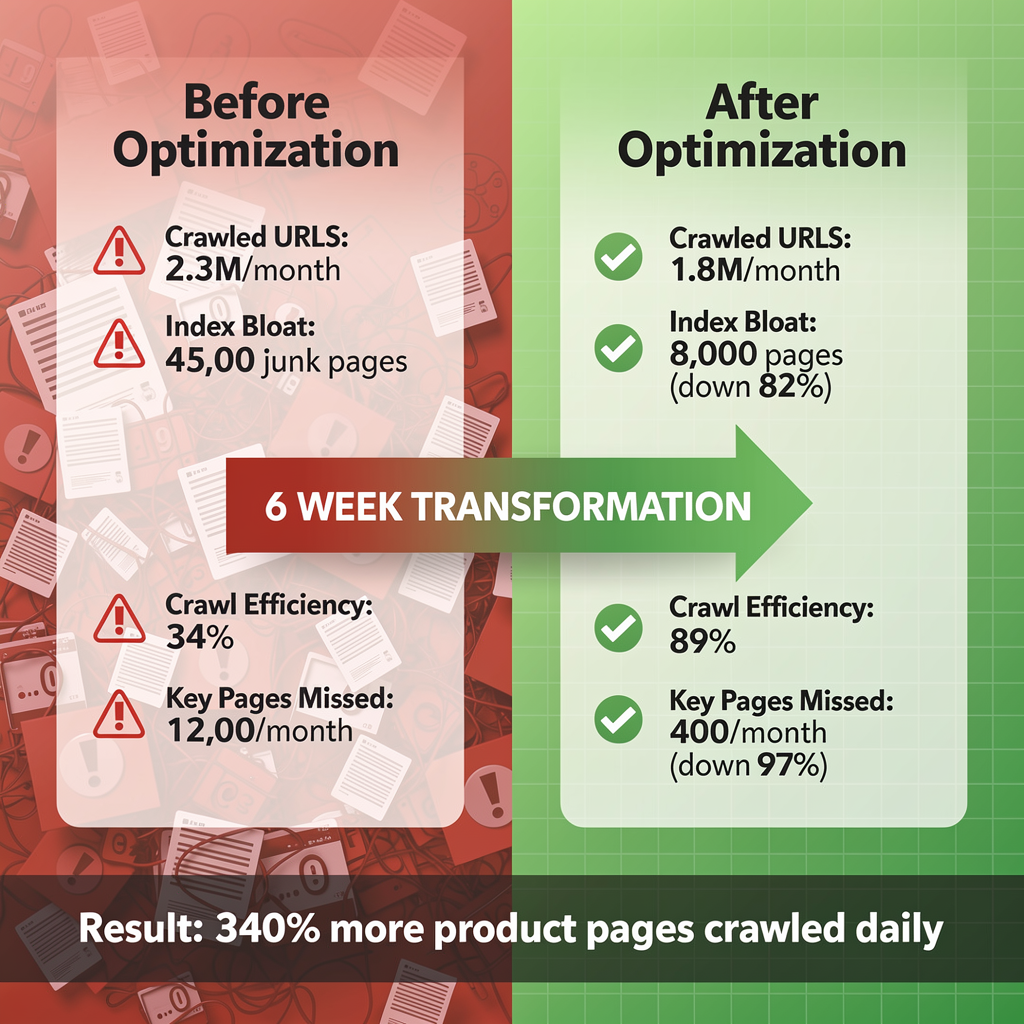
5. Robots.txt Optimization Strategies
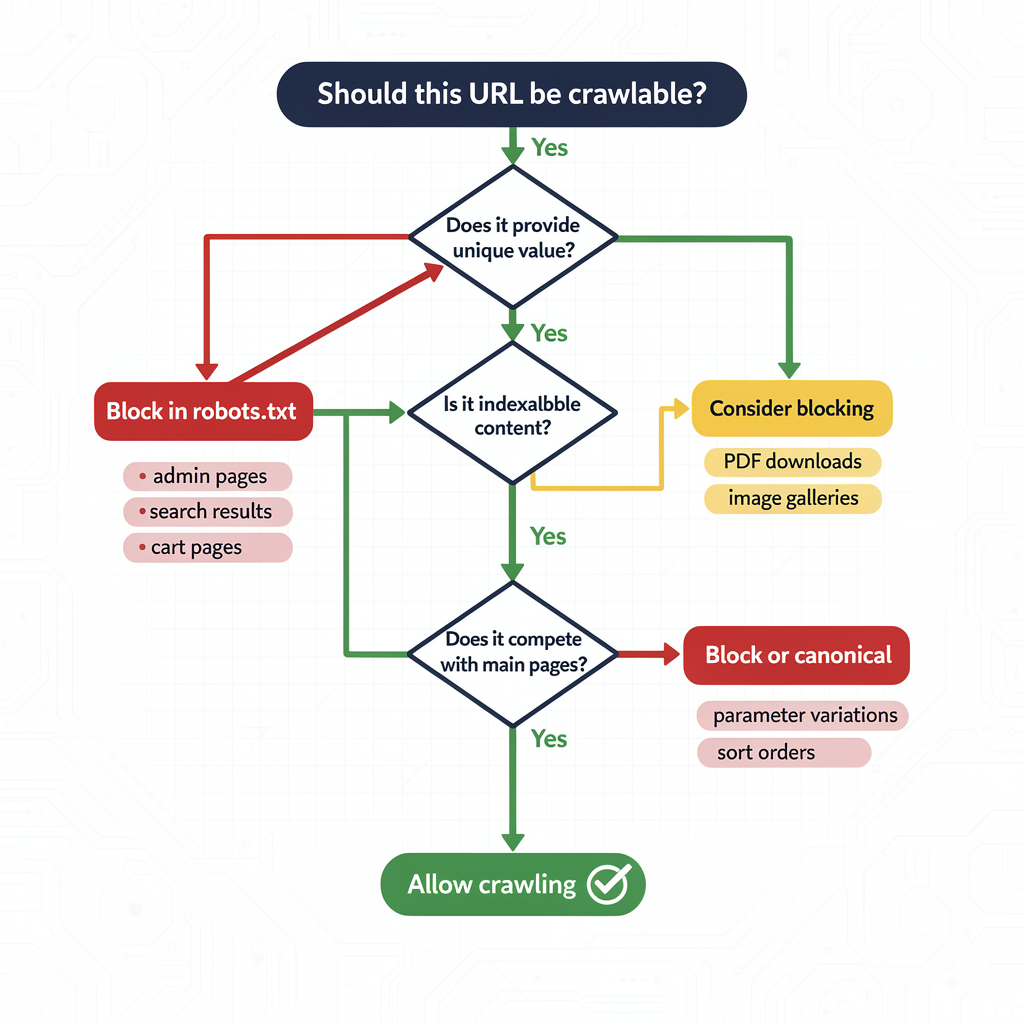
Fundamental Robots.txt Structure
# Crawl Budget Optimized robots.txt
# Last updated: 2026-01-15
# ========================================
# GLOBAL RULES (All Crawlers)
# ========================================
User-agent: *
# Block internal search results
Disallow: /search/
Disallow: /search?
Disallow: /*?q=
Disallow: /*?s=
# Block filter/faceted navigation
Disallow: /filter/
Disallow: /*?filter=
Disallow: /*?color=
Disallow: /*?size=
Disallow: /*?price=
Disallow: /*?sort=
Disallow: /*?order=
# Block pagination beyond page 1 (optional - test first)
# Disallow: /*?page=
# Block URL parameters
Disallow: /*?utm_
Disallow: /*?ref=
Disallow: /*?source=
Disallow: /*?affiliate=
Disallow: /*&sessionid=
Disallow: /*?gclid=
Disallow: /*?fbclid=
# Block user-specific pages
Disallow: /cart/
Disallow: /checkout/
Disallow: /account/
Disallow: /my-account/
Disallow: /wishlist/
Disallow: /compare/
# Block admin and system URLs
Disallow: /admin/
Disallow: /wp-admin/
Disallow: /administrator/
Disallow: /api/
Disallow: /cgi-bin/
Disallow: /tmp/
Disallow: /*.json$
Disallow: /*.xml$
# Block low-value archive patterns
Disallow: /tag/*/page/
Disallow: /author/*/page/
Disallow: /category/*/page/
# ========================================
# ALLOW CRITICAL RESOURCES FOR RENDERING
# ========================================
Allow: /wp-content/uploads/
Allow: /wp-content/themes/
Allow: /wp-includes/
Allow: /assets/
Allow: /*.css
Allow: /*.js
Allow: /*.jpg
Allow: /*.jpeg
Allow: /*.png
Allow: /*.gif
Allow: /*.svg
Allow: /*.webp
# ========================================
# GOOGLEBOT-SPECIFIC RULES
# ========================================
User-agent: Googlebot
# More permissive for Google if needed
Allow: /
# ========================================
# ADSBOT (Requires explicit handling)
# ========================================
User-agent: AdsBot-Google
User-agent: AdsBot-Google-Mobile
Disallow: /admin/
Disallow: /cart/
# ========================================
# SITEMAP DECLARATION
# ========================================
Sitemap: https://www.example.com/sitemap_index.xml
Advanced Robots.txt Patterns
Wildcard Blocking (Efficient Pattern Matching)
# Block all URLs with specific query strings
Disallow: /*?*sort=
Disallow: /*?*filter=
Disallow: /*?*page=*&
# Block multi-parameter URLs (3+ parameters)
# Note: This requires careful testing
Disallow: /*?*&*&*&
# Block specific file types
Disallow: /*.pdf$
Disallow: /*.doc$
Disallow: /*.xls$
Path-Based Blocking for Ecommerce
# Block color/size variant URLs
Disallow: /products/*-color-*
Disallow: /products/*-size-*
# Block compare functionality
Disallow: /compare/
Disallow: /*?compare=
# Block print versions
Disallow: /print/
Disallow: /*?print=
Disallow: /*?format=print
Common Robots.txt Mistakes
| Mistake | Impact | Solution |
| Blocking CSS/JS | Rendering fails | Always Allow: /*.css and Allow: /*.js |
Using crawl-delay | ⚠️ Googlebot ignores it | Use Search Console crawl rate instead |
| Blocking entire directories | May block important pages | Use specific patterns |
| No sitemap declaration | Missed optimization | Add Sitemap: directive |
Blocking with noindex expectation | Pages still crawled | noindex requires crawling to work |
6. Sitemap Best Practices
Sitemap Structure for Large Sites
<?xml version="1.0" encoding="UTF-8"?>
<sitemapindex xmlns="http://www.sitemaps.org/schemas/sitemap/0.9">
  <!-- Product sitemaps (split by category) -->
  <sitemap>
    <loc>https://www.example.com/sitemaps/products-electronics.xml</loc>
    <lastmod>2026-01-15T10:00:00+00:00</lastmod>
  </sitemap>
  <sitemap>
    <loc>https://www.example.com/sitemaps/products-clothing.xml</loc>
    <lastmod>2026-01-15T08:30:00+00:00</lastmod>
  </sitemap>
  <!-- Content sitemaps -->
  <sitemap>
    <loc>https://www.example.com/sitemaps/blog.xml</loc>
    <lastmod>2026-01-15T12:00:00+00:00</lastmod>
  </sitemap>
  <sitemap>
    <loc>https://www.example.com/sitemaps/pages.xml</loc>
    <lastmod>2026-01-10T00:00:00+00:00</lastmod>
  </sitemap>
  <!-- Image sitemap -->
  <sitemap>
    <loc>https://www.example.com/sitemaps/images.xml</loc>
    <lastmod>2026-01-15T06:00:00+00:00</lastmod>
  </sitemap>
</sitemapindex>
Individual Sitemap Format
<?xml version="1.0" encoding="UTF-8"?>
<urlset xmlns="http://www.sitemaps.org/schemas/sitemap/0.9"
        xmlns:image="http://www.google.com/schemas/sitemap-image/1.1">
  <url>
    <loc>https://www.example.com/products/wireless-headphones/</loc>
    <lastmod>2026-01-15T10:30:00+00:00</lastmod>
    <image:image>
      <image:loc>https://www.example.com/images/wireless-headphones.jpg</image:loc>
      <image:title>Wireless Bluetooth Headphones</image:title>
    </image:image>
  </url>
  <url>
    <loc>https://www.example.com/products/smart-watch/</loc>
    <lastmod>2026-01-14T15:45:00+00:00</lastmod>
  </url>
</urlset>
Sitemap Optimization Rules
| Best Practice | Why It Matters |
| Only include canonical URLs | Duplicates waste sitemap space |
Accurate <lastmod> dates | Signals content freshness to Google |
| Split by content type | Easier management and debugging |
| Maximum 50,000 URLs per file | Protocol limit |
| Maximum 50MB uncompressed | Protocol limit |
| Use gzip compression | Faster downloads (doesn’t save crawl budget) |
Update index file <lastmod> | Triggers re-crawl of child sitemaps |
| Remove 404/410 URLs | Don’t include non-existent pages |
| Match canonical declarations | Sitemap URL = page canonical |
Dynamic Sitemap Generation (Python Example)
# generate_sitemap.py
import xml.etree.ElementTree as ET
from datetime import datetime
import gzip
def generate_product_sitemap(products, output_path):
    """Generate product sitemap from database/API"""
    urlset = ET.Element('urlset')
    urlset.set('xmlns', 'http://www.sitemaps.org/schemas/sitemap/0.9')
    for product in products:
        # Skip non-canonical URLs
        if not product.is_canonical:
            continue
        # Skip out-of-stock products (optional)
        if not product.in_stock and product.days_out_of_stock > 30:
            continue
        url = ET.SubElement(urlset, 'url')
        loc = ET.SubElement(url, 'loc')
        loc.text = f"https://www.example.com/products/{product.slug}/"
        lastmod = ET.SubElement(url, 'lastmod')
        lastmod.text = product.updated_at.strftime('%Y-%m-%dT%H:%M:%S+00:00')
    tree = ET.ElementTree(urlset)
    # Write compressed
    with gzip.open(f"{output_path}.gz", 'wb') as f:
        tree.write(f, encoding='UTF-8', xml_declaration=True)
    print(f"Generated sitemap with {len(products)} URLs")
# Usage
products = fetch_products_from_db()
generate_product_sitemap(products, '/var/www/sitemaps/products.xml')
7. Handling Duplicate Content
Duplicate content is one of the biggest crawl budget killers. Every duplicate URL crawled is a wasted opportunity.
Types of Duplicate Content
| Type | Example | Solution |
| Protocol duplicates | http vs https | 301 redirect to HTTPS |
| WWW duplicates | www vs non-www | 301 redirect to preferred |
| Trailing slash | /page vs /page/ | Pick one, 301 redirect other |
| Parameter duplicates | /page?ref=twitter | Canonical to clean URL |
| Case variations | /Page vs /page | 301 redirect to lowercase |
| Index page | /folder/ vs /folder/index.html | Canonical or redirect |
Canonical Tag Implementation
<!-- Every page needs a self-referencing canonical -->
<head>
  <link rel="canonical" href="https://www.example.com/products/widget/" />
</head>
For parameter URLs:
<!-- On /products/widget/?color=red&ref=email -->
<head>
  <link rel="canonical" href="https://www.example.com/products/widget/" />
</head>
Redirect Implementation
Apache (.htaccess)
# Force HTTPS
RewriteEngine On
RewriteCond %{HTTPS} off
RewriteRule ^(.*)$ https://%{HTTP_HOST}%{REQUEST_URI} [L,R=301]
# Force www
RewriteCond %{HTTP_HOST} !^www\. [NC]
RewriteRule ^(.*)$ https://www.%{HTTP_HOST}/$1 [L,R=301]
# Force trailing slash
RewriteCond %{REQUEST_FILENAME} !-f
RewriteCond %{REQUEST_URI} !(.*)/$
RewriteRule ^(.*)$ https://%{HTTP_HOST}/$1/ [L,R=301]
# Remove common tracking parameters
RewriteCond %{QUERY_STRING} ^(.*)&?utm_[^&]+(.*)$ [NC]
RewriteRule ^(.*)$ /$1?%1%2 [R=301,L]
Nginx
# Force HTTPS and www
server {
    listen 80;
    listen 443 ssl;
    server_name example.com;
    return 301 https://www.example.com$request_uri;
}
# Main server block
server {
    listen 443 ssl http2;
    server_name www.example.com;
    # Force trailing slash
    rewrite ^([^.]*[^/])$ $1/ permanent;
    # Strip tracking parameters
    if ($args ~* "utm_") {
        rewrite ^(.*)$ $1? permanent;
    }
}
Duplicate Content Audit Checklist
- All pages have self-referencing canonical tags
- HTTPS enforced across entire site
- WWW/non-WWW consolidated
- Trailing slash convention consistent
- Tracking parameters stripped or canonicalized
- Pagination uses
rel="canonical"to page 1 or view-all - Product variants canonicalize to main product
- Hreflang URLs match canonical declarations
8. URL Parameter Management
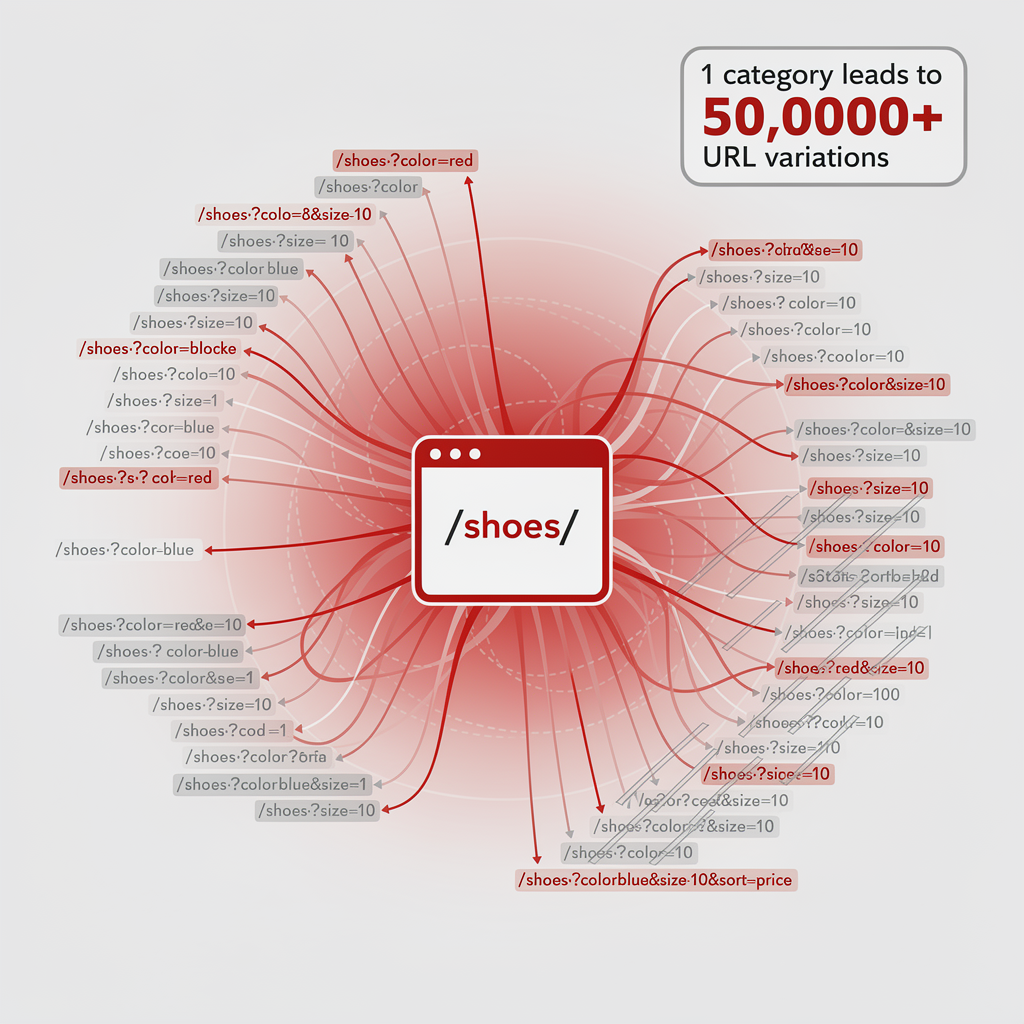
URL parameters can explode your URL count exponentially, devastating crawl budget.
Parameter Impact Analysis
Example: Ecommerce filter explosion
Base URL: /products/shoes/
Parameters: color (10), size (15), brand (20), price (5), sort (4)
Total combinations: 10 × 15 × 20 × 5 × 4 = 60,000 URLs
From just ONE category page!
Parameter Handling Strategies
| Parameter Type | Strategy | Implementation |
| Tracking(utm_, ref, gclid) | Block or strip | robots.txt + server redirect |
| Session(sessionid, sid) | Block | robots.txt |
| Sorting(sort, order) | Canonicalize | rel=”canonical” to default |
| Pagination(page, p) | Allow first pages, block deep | robots.txt for page>10 |
| Filters(color, size) | Block or AJAX | robots.txt or JavaScript |
| Facets(multi-filter) | Block completely | robots.txt |
Parameter Stripping Solutions
Server-Level Stripping (Recommended)
# Nginx - Strip tracking parameters
location / {
    if ($args ~* "^(.*)(?:^|&)(utm_[^&]*|gclid|fbclid|ref)(?:&(.*))?$") {
        set $args $1$3;
        rewrite ^(.*)$ $1 permanent;
    }
}
JavaScript-Level (For SPAs)
// Clean URL parameters client-side
function cleanTrackingParams() {
  const url = new URL(window.location.href);
  const paramsToRemove = ['utm_source', 'utm_medium', 'utm_campaign', 'gclid', 'fbclid'];
  let changed = false;
  paramsToRemove.forEach(param => {
    if (url.searchParams.has(param)) {
      url.searchParams.delete(param);
      changed = true;
    }
  });
  if (changed) {
    window.history.replaceState({}, '', url.toString());
  }
}
// Run on page load
cleanTrackingParams();
9. Server Performance Optimization
“Enhancing your server’s response speed can potentially allow Googlebot to crawl more pages on your site.” — Google Search Central
Response Time Targets
| Metric | Target | Impact on Crawling |
| TTFB | <200ms | Direct crawl rate multiplier |
| Full page load | <1s | Affects rendered content crawling |
| 5xx error rate | <0.1% | High rates = crawl throttling |
| Timeout rate | 0% | Timeouts severely limit crawling |
Server Optimization Checklist
1. Enable Compression
# Nginx gzip configuration
gzip on;
gzip_vary on;
gzip_min_length 1024;
gzip_proxied any;
gzip_types
    text/plain
    text/css
    text/javascript
    application/javascript
    application/json
    application/xml
    image/svg+xml;
gzip_comp_level 6;
2. Implement Caching
# Browser caching
location ~* \.(jpg|jpeg|png|gif|ico|css|js|svg|woff2)$ {
    expires 1y;
    add_header Cache-Control "public, immutable";
}
# Page caching (static HTML)
location / {
    try_files /cache$uri/index.html $uri $uri/ @backend;
}
3. Use CDN for Static Assets
<!-- Serve assets from CDN -->
<link rel="stylesheet" href="https://cdn.example.com/css/style.css">
<script src="https://cdn.example.com/js/app.js" defer></script>
<img src="https://cdn.example.com/images/hero.webp" alt="Hero">
4. Optimize Database Queries
-- Add indexes for common queries
CREATE INDEX idx_products_category ON products(category_id);
CREATE INDEX idx_products_status ON products(status, created_at);
-- Use query caching
SET GLOBAL query_cache_size = 268435456; -- 256MB
Monitoring Server Performance
# Monitor response times for Googlebot
tail -f /var/log/nginx/access.log | grep -i googlebot | awk '{print $NF}'
# Check average response time
awk '/Googlebot/ {sum+=$NF; count++} END {print sum/count}' /var/log/nginx/access.logFaceted navigation (filters) is the #1 crawl budget killer for ecommerce sites.
The Problem Visualized
Category: /shoes/
Facets applied:
├── /shoes/?color=red (1 facet)
├── /shoes/?color=red&size=10 (2 facets)
├── /shoes/?color=red&size=10&brand=nike (3 facets)
├── /shoes/?color=red&size=10&brand=nike&sort=price (4 facets)
└── … potentially millions of combinations
Solution Matrix
| Solution | Pros | Cons | Best For |
| robots.txt blocking | Easy, immediate | Loses all filter pages | Sites with simple filters |
| AJAX-based filters | No crawlable URLs | Requires JavaScript | Modern SPAs |
| View-all canonical | Maintains indexability | Only works for pagination | Category pages |
| Key filter pages only | Some filter pages indexed | Complex to maintain | High-search-volume filters |
| Hash fragments | URLs not crawled | Bad for SEO of filter pages | User preference only |
Implementation: AJAX-Based Filters
// Filters update content without changing URL
document.querySelectorAll('.filter-option').forEach(filter => {
  filter.addEventListener('click', async (e) => {
    e.preventDefault();
    const filterValue = e.target.dataset.value;
    const filterType = e.target.dataset.type;
    // Update UI state
    updateActiveFilters(filterType, filterValue);
    // Fetch filtered results via AJAX
    const response = await fetch('/api/products', {
      method: 'POST',
      body: JSON.stringify(getActiveFilters())
    });
    const products = await response.json();
    renderProducts(products);
    // Optional: Update URL hash for user bookmarking (not crawled)
    updateUrlHash(getActiveFilters());
  });
});
function updateUrlHash(filters) {
  const hash = Object.entries(filters)
    .map(([key, value]) => `${key}=${value}`)
    .join('&');
  window.location.hash = hash;
}
Implementation: Selective Indexing
# robots.txt - Block most filter combinations
User-agent: *
# Allow single-filter category pages (high search volume)
Allow: /shoes/red/
Allow: /shoes/nike/
Allow: /shoes/running/
# Block multi-filter combinations
Disallow: /shoes/?*&*
Disallow: /shoes/*color=*size=
Disallow: /*?sort=
Disallow: /*?page=
<!-- For allowed filter pages, use specific canonical -->
<!-- On /shoes/red/ -->
<link rel="canonical" href="https://www.example.com/shoes/red/" />
<!-- For blocked filter combinations, canonical to parent -->
<!-- On /shoes/?color=red&size=10&brand=nike -->
<link rel="canonical" href="https://www.example.com/shoes/" />
10.5. Crawl Budget for JavaScript Frameworks
Modern JavaScript frameworks require special crawl budget considerations due to client-side rendering challenges.
Understanding Render Budget vs. Crawl Budget
Render budgetis a related but distinct concept from crawl budget. While crawl budget determines how many pagesGoogle fetches, render budget determines how many JavaScript-heavy pagesGoogle can actually process and understand.
Crawl Budget → Fetching HTML
Render Budget → Executing JavaScript to get final content
| Budget Type | Resource Used | Bottleneck | Solution |
| Crawl Budget | Googlebot bandwidth | Server response time | Faster servers, fewer URLs |
| Render Budget | Google’s rendering service (WRS) | JavaScript execution | SSR/SSG, simpler JS |
Key Insight:A page can be crawled (HTML fetched) but never rendered (JavaScript not executed). This creates “zombie pages”—technically crawled but with incomplete content in Google’s index.
Symptoms of Render Budget Exhaustion:
- Partial content indexed (missing dynamic elements)
- “Discovered – currently not indexed” for JS-heavy pages
- Mobile-first indexing issues
- Stale content despite recent updates
The JavaScript Crawling Challenge
| Framework | Default Rendering | Crawl Budget Impact | Recommendation |
| React (CRA) | Client-side (CSR) | High waste | Migrate to Next.js |
| Next.js | SSR/SSG/ISR | Efficient | Use SSG for static pages |
| Vue.js | Client-side | High waste | Use Nuxt.js |
| Angular | Client-side | High waste | Use Angular Universal |
| Gatsby | Static Generation | Excellent | Ideal for content sites |
Mobile-First Indexing Note:Googlebot Smartphone is the primary crawler for all websites. Ensure your mobile site has the same crawl efficiency, content, and structured data as desktop. JavaScript rendering issues on mobile directly impact your crawl budget allocation.
JavaScript Rendering and Crawl Budget
When Googlebot encounters a JavaScript-rendered page:
- First wave:HTML is fetched (counts toward crawl budget)
- Render queue:Page waits for rendering resources
- Second wave:Rendered content is indexed (additional resource cost)
// Detect if Googlebot is rendering your content
if (typeof window !== 'undefined') {
  // Check for hydration completion
  window.addEventListener('load', () => {
    const isHydrated = document.querySelector('[data-hydrated="true"]');
    if (!isHydrated) {
      console.warn('SSR hydration may have failed');
    }
  });
}
SSR/SSG Best Practices for Crawl Efficiency
// Next.js - Use getStaticProps for crawl-efficient pages
export async function getStaticProps() {
  const products = await fetchProducts();
  return {
    props: { products },
    revalidate: 3600, // ISR: Revalidate every hour
  };
}
// This ensures Googlebot receives complete HTML on first request
// No second-wave rendering needed = better crawl budget efficiency
For comprehensive JavaScript SEO optimization, see our React SEO Guidecovering SSR, hydration, and Core Web Vitals.
11. Monitoring and Measurement
Key Performance Indicators (KPIs)
| KPI | Target | Measurement Source |
| Crawl requests/day | Stable or growing | GSC Crawl Stats |
| % 200 responses | >95% | GSC Crawl Stats |
| Average response time | <500ms | GSC Crawl Stats |
| Pages indexed/discovered | >80% | GSC Coverage Report |
| Time to index new content | <48 hours | Manual testing |
| Crawl waste ratio | <10% | Log file analysis |
Google Search Console Monitoring Setup
Weekly Crawl Health Check:
1. Settings → Crawl Stats
- Compare crawl requests vs. previous period
- Check response code distribution
- Monitor file type breakdown
2. Index → Coverage
- Track “Discovered – currently not indexed”
- Monitor “Crawled – currently not indexed”
- Review excluded page reasons
3. Sitemaps
- Verify submitted vs. indexed counts
- Check for sitemap errors
- Monitor last read date
Orphan Pages Detection Script
Orphan pages (pages with no internal links pointing to them) waste crawl budget because Googlebot discovers them through sitemaps but cannot understand their importance in your site hierarchy.
# orphan_pages_detector.py
import requests
from bs4 import BeautifulSoup
from urllib.parse import urljoin, urlparse
import xml.etree.ElementTree as ET
class OrphanPagesDetector:
    def __init__(self, domain):
        self.domain = domain
        self.crawled_urls = set()
        self.linked_urls = set()
        self.sitemap_urls = set()
    def crawl_internal_links(self, start_url, max_pages=1000):
        """Crawl site to find all internal links"""
        to_crawl = [start_url]
        while to_crawl and len(self.crawled_urls) < max_pages:
            url = to_crawl.pop(0)
            if url in self.crawled_urls:
                continue
            try:
                response = requests.get(url, timeout=10)
                self.crawled_urls.add(url)
                soup = BeautifulSoup(response.text, 'html.parser')
                for link in soup.find_all('a', href=True):
                    href = urljoin(url, link['href'])
                    parsed = urlparse(href)
                    if parsed.netloc == urlparse(self.domain).netloc:
                        clean_url = f"{parsed.scheme}://{parsed.netloc}{parsed.path}"
                        self.linked_urls.add(clean_url)
                        if clean_url not in self.crawled_urls:
                            to_crawl.append(clean_url)
            except Exception as e:
                print(f"Error crawling {url}: {e}")
    def parse_sitemap(self, sitemap_url):
        """Extract all URLs from sitemap"""
        try:
            response = requests.get(sitemap_url)
            root = ET.fromstring(response.content)
            # Handle sitemap index
            for sitemap in root.findall('.//{http://www.sitemaps.org/schemas/sitemap/0.9}loc'):
                url = sitemap.text
                if 'sitemap' in url.lower():
                    self.parse_sitemap(url)  # Recursive for sitemap index
                else:
                    self.sitemap_urls.add(url)
        except Exception as e:
            print(f"Error parsing sitemap: {e}")
    def find_orphans(self):
        """Find pages in sitemap but not linked internally"""
        orphans = self.sitemap_urls - self.linked_urls
        return {
            'orphan_count': len(orphans),
            'orphan_urls': list(orphans),
            'crawl_waste_estimate': f"{(len(orphans) / len(self.sitemap_urls) * 100):.1f}%",
            'recommendation': 'Add internal links to orphan pages or remove from sitemap'
        }
# Usage
detector = OrphanPagesDetector('https://www.example.com')
detector.crawl_internal_links('https://www.example.com/')
detector.parse_sitemap('https://www.example.com/sitemap.xml')
orphans = detector.find_orphans()
print(f"Found {orphans['orphan_count']} orphan pages")
Google Search Console API Automation
Automate crawl budget monitoring with the official GSC API:
# gsc_crawl_budget_api.py
from google.oauth2.credentials import Credentials
from googleapiclient.discovery import build
from datetime import datetime, timedelta
import json
class GSCCrawlBudgetAPI:
    def __init__(self, credentials_path, site_url):
        self.site_url = site_url
        self.service = self._authenticate(credentials_path)
    def _authenticate(self, credentials_path):
        """Authenticate with GSC API"""
        creds = Credentials.from_authorized_user_file(
            credentials_path,
            scopes=['https://www.googleapis.com/auth/webmasters.readonly']
        )
        return build('searchconsole', 'v1', credentials=creds)
    def get_index_coverage(self):
        """Get index coverage report via API"""
        # Note: Index coverage not directly available via API
        # Use URL Inspection API for individual URLs
        pass
    def inspect_url(self, url):
        """Inspect individual URL for indexing status"""
        request = {
            'inspectionUrl': url,
            'siteUrl': self.site_url
        }
        response = self.service.urlInspection().index().inspect(
            body=request
        ).execute()
        return {
            'url': url,
            'indexing_state': response['inspectionResult']['indexStatusResult']['indexingState'],
            'crawled_as': response['inspectionResult']['indexStatusResult'].get('crawledAs'),
            'last_crawl_time': response['inspectionResult']['indexStatusResult'].get('lastCrawlTime'),
            'robots_txt_state': response['inspectionResult']['indexStatusResult'].get('robotsTxtState')
        }
    def batch_inspect_urls(self, urls):
        """Inspect multiple URLs (respects API limits)"""
        results = []
        for url in urls[:100]:  # API limit: 600/min, 2000/day
            try:
                result = self.inspect_url(url)
                results.append(result)
            except Exception as e:
                results.append({'url': url, 'error': str(e)})
        return results
    def generate_crawl_report(self, sample_urls):
        """Generate comprehensive crawl status report"""
        inspections = self.batch_inspect_urls(sample_urls)
        indexed = sum(1 for r in inspections if r.get('indexing_state') == 'INDEXED')
        not_indexed = len(inspections) - indexed
        return {
            'date': datetime.now().isoformat(),
            'site': self.site_url,
            'sample_size': len(inspections),
            'indexed': indexed,
            'not_indexed': not_indexed,
            'index_rate': f"{(indexed/len(inspections)*100):.1f}%",
            'details': inspections
        }
# Usage
api = GSCCrawlBudgetAPI('credentials.json', 'sc-domain:example.com')
report = api.generate_crawl_report(['https://example.com/page1', 'https://example.com/page2'])
print(json.dumps(report, indent=2))
Automated Monitoring Script
# crawl_budget_monitor.py
import requests
from datetime import datetime, timedelta
import json
class CrawlBudgetMonitor:
    def __init__(self, site_url, gsc_credentials):
        self.site_url = site_url
        self.credentials = gsc_credentials
    def get_crawl_stats(self, days=90):
        """Fetch crawl stats from GSC API"""
        # GSC API implementation
        pass
    def analyze_trends(self, stats):
        """Analyze crawl trends for anomalies"""
        alerts = []
        # Check for declining crawl rate
        recent_avg = sum(stats[-7:]) / 7
        previous_avg = sum(stats[-30:-7]) / 23
        if recent_avg < previous_avg * 0.8:
            alerts.append({
                'severity': 'HIGH',
                'message': f'Crawl rate declined {((1 - recent_avg/previous_avg) * 100):.1f}%',
                'recommendation': 'Check server logs for errors, verify robots.txt'
            })
        # Check for response time spikes
        # Check for error rate increases
        return alerts
    def generate_report(self):
        """Generate weekly crawl budget report"""
        stats = self.get_crawl_stats()
        alerts = self.analyze_trends(stats)
        report = {
            'date': datetime.now().isoformat(),
            'site': self.site_url,
            'summary': {
                'total_crawls': sum(stats[-7:]),
                'avg_daily': sum(stats[-7:]) / 7,
                'trend': 'up' if stats[-1] > stats[-8] else 'down'
            },
            'alerts': alerts
        }
        return report
# Usage
monitor = CrawlBudgetMonitor('https://www.example.com', credentials)
report = monitor.generate_report()
print(json.dumps(report, indent=2))
12. Advanced Strategies for Large Sites
Crawl Budget for News Sites
News publishers face unique crawl budget challenges due to high content velocity and time-sensitive indexing requirements.
News Site Crawl Budget Characteristics:
| Factor | News Sites | E-commerce | Corporate |
| Content velocity | 50-500+ articles/day | 10-100/day | 1-10/week |
| Content decay | Hours to days | Weeks to months | Years |
| Indexing urgency | Critical (minutes) | Important (hours) | Normal (days) |
| Crawl frequency | Continuous | Daily | Weekly |
News-Specific Optimization Strategies:
1. News Sitemap Implementation
<?xml version="1.0" encoding="UTF-8"?>
<urlset xmlns="http://www.sitemaps.org/schemas/sitemap/0.9"
        xmlns:news="http://www.google.com/schemas/sitemap-news/0.9">
  <url>
    <loc>https://www.example.com/business/article-123</loc>
    <news:news>
      <news:publication>
        <news:name>Example Times</news:name>
        <news:language>en</news:language>
      </news:publication>
      <news:publication_date>2026-01-15T08:30:00+00:00</news:publication_date>
      <news:title>Breaking: Major Economic Announcement</news:title>
    </news:news>
  </url>
</urlset>
2. Real-Time Indexing Pipeline
# news_indexing_pipeline.py
import requests
from datetime import datetime
class NewsIndexingPipeline:
    def __init__(self):
        self.sitemap_url = "https://www.example.com/news-sitemap.xml"
        self.indexnow_key = "your-indexnow-key"
    def publish_article(self, article):
        """Called when new article is published"""
        # 1. Add to news sitemap immediately
        self.update_news_sitemap(article)
        # 2. Ping Google (sitemap notification)
        self.ping_google()
        # 3. Submit to IndexNow (Bing, Yandex)
        self.submit_indexnow(article.url)
        # 4. Submit to Google Indexing API (if eligible)
        if article.type in ['job_posting', 'livestream']:
            self.submit_google_indexing_api(article.url)
    def ping_google(self):
        """Notify Google of sitemap update"""
        ping_url = f"https://www.google.com/ping?sitemap={self.sitemap_url}"
        requests.get(ping_url)
3. Archive Management for News Sites
| Content Age | Action | Crawl Priority |
| 0-48 hours | News sitemap | Critical |
| 2-7 days | Regular sitemap | High |
| 7-30 days | Regular sitemap | Medium |
| 30+ days | Archive sitemap | ⚪ Low |
| 1+ year | Consider noindex | ❌ None |
Pro tip:Remove articles older than 2 days from your news sitemap. They should move to your regular sitemap to free up news crawl budget for fresh content.
URL Prioritization Framework
For sites with 100K+ pages, implement a tiered crawl priority system:
| Tier | Description | Signals to Google |
| Tier 1 | Money pages (products, services) | Sitemap priority, internal links |
| Tier 2 | Supporting content (blog, guides) | Secondary sitemap, moderate linking |
| Tier 3 | Utility pages (about, contact) | Minimal sitemap inclusion |
| Tier 4 | Low-value (old posts, thin content) | Noindex or remove |
Internal Linking for Crawl Efficiency
<!-- Hub and spoke model for categories -->
<nav class="category-navigation">
  <a href="/products/">All Products</a>
  <a href="/products/electronics/">Electronics</a>
  <a href="/products/clothing/">Clothing</a>
</nav>
<!-- Related products for product page crawling -->
<section class="related-products">
  <h2>Related Products</h2>
  <a href="/products/widget-pro/">Widget Pro</a>
  <a href="/products/widget-lite/">Widget Lite</a>
</section>
<!-- Breadcrumbs for category structure -->
<nav aria-label="Breadcrumb">
  <ol>
    <li><a href="/">Home</a></li>
    <li><a href="/products/">Products</a></li>
    <li><a href="/products/electronics/">Electronics</a></li>
    <li>Wireless Headphones</li>
  </ol>
</nav>
Dynamic Sitemap Priority
# Adjust sitemap based on product performance
def calculate_sitemap_priority(product):
    """Calculate dynamic priority based on signals"""
    base_priority = 0.5
    # Boost for recent updates
    days_since_update = (datetime.now() - product.updated_at).days
    if days_since_update < 7:
        base_priority += 0.2
    elif days_since_update < 30:
        base_priority += 0.1
    # Boost for high performers
    if product.monthly_revenue > 10000:
        base_priority += 0.2
    elif product.monthly_revenue > 1000:
        base_priority += 0.1
    # Boost for in-stock items
    if product.in_stock:
        base_priority += 0.1
    return min(base_priority, 1.0)
Instant Indexing Options
While crawl budget optimization focuses on Google’s natural crawling, you can also proactively notify search engines:
| Method | Search Engines | Use Case | Limitations |
| IndexNow | Bing, Yandex, Naver | Instant content updates | Google doesn’t support (yet) |
| Google Indexing API | Google only | Job postings, livestreams | Limited content types |
| Sitemap ping | All | New sitemap submission | Not instant, queued |
| Search Console URL Inspection | Google only | Individual URL requests | 10/day limit |
IndexNow Implementation:
# Notify Bing/Yandex of content changes instantly
curl -X POST "https://api.indexnow.org/indexnow" \
  -H "Content-Type: application/json" \
  -d '{
    "host": "www.example.com",
    "key": "your-api-key",
    "urlList": [
      "https://www.example.com/new-page/",
      "https://www.example.com/updated-page/"
    ]
  }'
Pro tip:Use IndexNow alongside crawl budget optimization. Google may adopt IndexNow in the future, and it provides instant visibility on Bing (10%+ of search traffic for many sites).
Crawl Budget for International Sites
<!-- Separate sitemaps per locale -->
<sitemapindex>
  <sitemap>
    <loc>https://www.example.com/sitemap-en-us.xml</loc>
  </sitemap>
  <sitemap>
    <loc>https://www.example.com/sitemap-en-gb.xml</loc>
  </sitemap>
  <sitemap>
    <loc>https://www.example.com/sitemap-de-de.xml</loc>
  </sitemap>
</sitemapindex>
<!-- Hreflang implementation -->
<link rel="alternate" hreflang="en-us" href="https://www.example.com/products/widget/" />
<link rel="alternate" hreflang="en-gb" href="https://www.example.co.uk/products/widget/" />
<link rel="alternate" hreflang="de-de" href="https://www.example.de/produkte/widget/" />
<link rel="alternate" hreflang="x-default" href="https://www.example.com/products/widget/" />13. Common Myths Debunked
Myth 1: “noindex saves crawl budget”
Reality:Google must crawl a page to find the noindex directive. The page is still crawled; it just won’t be indexed.
“Using noindex can indirectly free up crawl budget over the long run… However, noindex is crucial for preventing pages from being indexed.” — Google Search Central
Better solution:Use robots.txt to prevent crawling entirely.
Myth 2: “crawl-delay works for Googlebot”
Reality:Googlebot ignores the crawl-delay robots.txt directive.
“Googlebot does not process the non-standard crawl-delay robots.txt rule.” — Google Search Central
Better solution:Adjust crawl rate in Search Console or improve server performance.
Myth 3: “Compressing sitemaps saves crawl budget”
Reality:Zipped sitemaps still require fetching from the server.
“Compressing sitemaps does not increase your crawl budget. Zipped sitemaps still need to be fetched from the server.” — Google Search Central
Better solution:Focus on sitemap content quality, not compression.
Myth 4: “4xx errors waste crawl budget”
Reality:4xx errors are actually efficient for crawl budget.
“Pages that serve 4xx HTTP status codes (except 429) don’t waste crawl budget. Google attempted to crawl the page, but received a status code and no other content.” — Google Search Central
Key insight:Returning proper 404/410 for removed pages is good practice.
Myth 5: “More pages = more crawl budget needed”
Reality:Crawl budget is about efficiency, not raw volume.
Better approach:Focus on consolidating duplicate content, blocking low-value pages, and improving page quality rather than requesting more crawl budget.
Myth 6: “Using noindex temporarily saves crawl budget”
Reality:Google explicitly warns against this practice.
“Don’t use robots.txt to temporarily reallocate crawl budget for other pages; use robots.txt to block pages or resources that you don’t want Google to crawl at all. Google won’t shift this newly available crawl budget to other pages unless Google is already hitting your site’s serving limit.” — Google Search Central(December 2025)
Key insight:Blocking pages doesn’t automatically increase crawl budget for other pages—it only helps if your server was already being overwhelmed.
How to Actually Get More Crawl Budget
According to Google’s official documentation (December 2025), there are only two waysto increase crawl budget:
- Add more server resources— If you’re seeing “Hostload exceeded” errors in URL Inspection, your server is the bottleneck
- Optimize content quality— Google allocates resources based on popularity, user value, content uniqueness, and serving capacity
14. Crawl Budget Audit Checklist

Pre-Audit Preparation
- Access to Google Search Console (owner level)
- Server log access (last 90 days)
- Current robots.txt file
- Current sitemap structure
- URL inventory spreadsheet
Technical Audit
Robots.txt Analysis
- Robots.txt is accessible (200 response)
- No accidental blocks on important pages
- CSS/JS files are allowed
- Low-value URL patterns blocked
- Sitemap declared
Sitemap Analysis
- Sitemap index properly structured
- All URLs return 200 status
- No blocked URLs in sitemap
<lastmod>dates accurate- URLs match canonical declarations
Duplicate Content
- Self-referencing canonicals on all pages
- Protocol consolidated (HTTP → HTTPS)
- WWW/non-WWW consolidated
- Trailing slash convention consistent
- Parameter URLs canonicalized
URL Parameters
- Tracking parameters stripped/blocked
- Session IDs blocked
- Sorting parameters handled
- Filter combinations managed
Server Performance
- TTFB <500ms for key pages
- 5xx error rate <0.1%
- Gzip compression enabled
- CDN for static assets
Post-Audit Actions
| Issue Found | Priority | Owner | Deadline |
15. Tools and Resources
Free Tools
| Tool | Purpose | Link |
| Google Search Console | Official crawl stats and indexing data | search.google.com/search-console |
| Robots.txt Tester | Validate robots.txt syntax | GSC Tools |
| URL Inspection Tool | Check individual URL crawl status | GSC |
| Screaming Frog (free tier) | Crawl up to 500 URLs | screamingfrog.co.uk |
| Bing Webmaster Tools | Additional crawl data perspective | bing.com/webmasters |
Premium Tools
| Tool | Best For | Starting Price |
| Screaming Frog | Technical SEO audits | $259/year |
| Sitebulb | Visual crawl analysis | $35/month |
| Botify | Enterprise log analysis | Custom |
| ContentKing | Real-time monitoring | $89/month |
| JetOctopus | Large-scale log analysis | $60/month |
| SearchAtlas | AI-powered SEO suite | Custom |
LinkGraph Services
For enterprise-level crawl budget optimization:
- Technical SEO Audits— Comprehensive crawl budget analysis
- Enterprise SEO— Large-scale site optimization
- Ecommerce SEO— Faceted navigation solutions
- Site Migration Services— Preserve crawl budget during moves
- JavaScript SEO— React, Vue, Angular optimization
- Core Web Vitals— Performance optimization for crawl efficiency
- Page Speed Optimization— Server response time improvements
16. FAQs
How do I know if I have a crawl budget problem?
Signs you have a crawl budget issue:
- New pages take weeks to get indexed
- Important pages show old cached versions
- “Discovered – currently not indexed” growing in GSC
- Crawl stats showing declining requests
- Server logs show Googlebot hitting low-value URLs
Diagnostic steps:
- Check GSC Crawl Stats for trends
- Review Coverage report exclusions
- Analyze server logs for crawl patterns
- Compare sitemap URLs vs. indexed URLs
How can I increase my crawl budget?
Actions that can increase crawl budget:
- Improve server speed— Faster responses = more pages per session
- Reduce crawl waste— Block low-value URLs with robots.txt
- Fix server errors— Eliminate 5xx responses
- Increase site popularity— More links = higher crawl demand
- Fresh, quality content— Google prioritizes valuable sites
Note:You cannot directly request more crawl budget from Google. Focus on making your site more efficient and valuable.
Should I block pagination from crawling?
It depends on your content strategy:
| Scenario | Recommendation |
| Blog/News pagination | Allow pages 1-10, block deeper |
| Ecommerce categories | Implement view-all page, canonicalize |
| Infinite scroll | Block all, use proper AJAX loading |
| Forum threads | Allow, they’re unique content |
Implementation:
# Block deep pagination
User-agent: *
Disallow: /*?page=1*
Disallow: /*?page=2*
# Continue for pages beyond your threshold
How long does it take to see results from crawl budget optimization?
Timeline expectations:
- Robots.txt changes:24-48 hours for Googlebot to re-fetch
- Crawl rate improvements:1-2 weeks to stabilize
- Indexing improvements:2-4 weeks for measurable change
- Full impact:1-3 months for comprehensive optimization
Monitoring during implementation:
- Check GSC Crawl Stats weekly
- Monitor “Discovered – not indexed” trend
- Track indexing speed for new content
What’s the difference between crawl budget and index budget?
| Aspect | Crawl Budget | Index Budget |
| Definition | How many pages Google will crawl | How many pages Google will index |
| Limiting factor | Server capacity + demand | Content quality + relevance |
| Your control | High (robots.txt, server speed) | Medium (content quality) |
| Measurement | GSC Crawl Stats | GSC Coverage Report |
Key insight:A page can be crawled but not indexed. Optimizing crawl budget ensures Google reaches your important pages; quality content ensures they get indexed.
Do CDNs help with crawl budget?
CDNs help indirectly:
- Faster response times → higher crawl capacity
- Reduced origin server load → more consistent performance
- Geographic distribution → better global crawl performance
But CDNs don’t directly increase crawl budget.The benefits come from improved server performance, which allows Googlebot to crawl more pages per session.
Conclusion: Crawl Budget Optimization Action Plan
Immediate Actions (This Week)
- Audit robots.txt— Block known crawl waste patterns
- Add canonical tags— Implement self-referencing canonicals
- Check server response times— Target <500ms for key pages
- Review GSC Crawl Stats— Baseline current performance
Short-Term (This Month)
- Clean up sitemap— Remove 404s, duplicates, blocked URLs
- Implement parameter handling— Strip tracking codes, manage filters
- Set up monitoring— Weekly crawl stats review process
- Fix duplicate content— Consolidate protocol/www/slash variations
Long-Term (This Quarter)
- Analyze log files— Understand actual Googlebot behavior
- Optimize faceted navigation— AJAX or selective indexing
- Improve internal linking— Guide crawlers to priority content
- Build crawl budget dashboard— Automated monitoring and alerts
Need expert help optimizing your crawl budget?Contact LinkGraphfor a comprehensive technical SEO audit tailored to your site’s specific challenges.
Related LinkGraph Resources
- Technical SEO Audit Guide — Complete technical SEO checklist
- JavaScript SEO Best Practices — Optimize JavaScript sites for crawling
- Core Web Vitals Guide— Performance optimization for SEO
- Site Migration Checklist — Preserve crawl budget during migrations
- XML Sitemap Best Practices — Optimize sitemaps for indexing
