
Table of Contents
- Executive Summary: Why Hreflang Matters
- What is Hreflang? The Technical Foundation
- When to Use Hreflang Tags
- Hreflang Syntax: The Complete Reference
- Implementation Methods: HTML, Sitemaps, and HTTP Headers
- The x-default Tag: Handling Unmatched Users
- Common Hreflang Errors and How to Fix Them
- Hreflang and Canonical Tags: The Critical Relationship
- URL Structure Strategies for International Sites
- Validation and Auditing Tools
- Advanced Patterns: Regional Variations and Edge Cases
- Case Study: Enterprise Hreflang Migration
- Hreflang Implementation Checklist
- FAQs
Executive Summary: Why Hreflang Matters
International SEO is one of the most technically complex areas of search optimization. When you have content in multiple languages or targeted at different regions, search engines need explicit signals to serve the correct version to each user. Without proper implementation, you risk:
- Duplicate content penalties from multiple similar pages
- Wrong language versions ranking in local markets
- Wasted crawl budget on redundant pages
- Poor user experience from language mismatches
The hreflang attribute is Google’s solution to this problem. First introduced in 2011, it remains the definitive method for signaling language and regional targeting to search engines. In this comprehensive guide, we’ll cover everything from basic syntax to enterprise-scale implementation patterns.
Key Insight: According to our research at LinkGraph, over 65% of international websites have significant hreflang implementation errors. The most common issues are missing return links, incorrect language codes, and conflicts with canonical tags. This guide will help you avoid these pitfalls.
What is Hreflang? The Technical Foundation
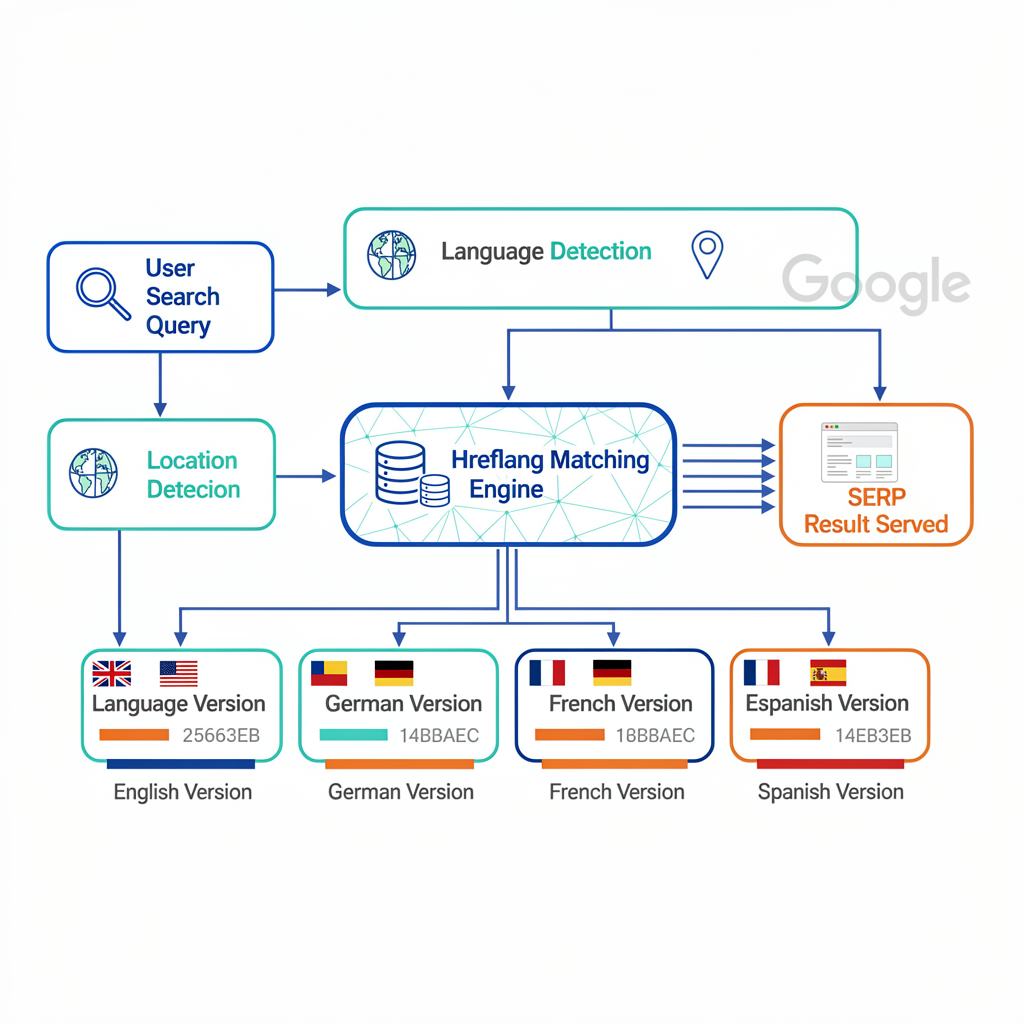
Hreflang is an HTML attribute that tells search engines which language and regional version of a page should be served to users based on their location and language preferences. It uses the rel="alternate" attribute combined with a hreflang value.
The Core Concept
When a user in France searches Google.fr, they expect French-language results. If you have both English and French versions of a page, hreflang tells Google:
“For French-speaking users, serve this URL. For English-speaking users, serve this other URL.”
How Google Uses Hreflang
Google’s John Mueller has confirmed that hreflang is a signal, not a directive. This means:
- Google uses hreflang as a strong hint for language/region targeting
- Other factors (user location, language preferences, search history) also influence which version appears
- Incorrect implementation can be ignored or cause unexpected behavior
Hreflang vs. Other International SEO Signals
| Signal | Purpose | Strength |
| Hreflang | Language/region targeting | Strong (explicit signal) |
| ccTLD (.fr, .de, .co.uk) | Country targeting | Strong (implicit signal) |
| Google Search Console Targeting | Country targeting | Medium |
| Content Language | Page language | Weak (often ignored) |
| IP-based Redirects | User location | Not recommended (can block Googlebot) |

When to Use Hreflang Tags
Hreflang is essential when you have alternate versions of pages for different audiences. Use it when:
1. Multilingual Content (Same Region)
You have content in multiple languages for the same country or market.
Example: A Canadian website with English and French versions.
<link rel="alternate" hreflang="en-ca" href="https://example.com/en-ca/page/" /><link rel="alternate" hreflang="fr-ca" href="https://example.com/fr-ca/page/" />2. Multi-Regional Content (Same Language)
You have content in the same language but targeted at different countries.
Example: English content for US, UK, and Australia.
<link rel="alternate" hreflang="en-us" href="https://example.com/us/page/" /><link rel="alternate" hreflang="en-gb" href="https://example.com/uk/page/" /><link rel="alternate" hreflang="en-au" href="https://example.com/au/page/" />3. Combined Language and Regional Targeting
You have both language and regional variations.
Example: A global e-commerce site with localized pricing and language.
When NOT to Use Hreflang
- Single-language, single-region sites — No alternates to signal
- Paginated content — Use
rel="prev/next"instead - Slightly different content — Only use for true translations/localizations
- User-generated translations — Quality must be equivalent
Hreflang Syntax: The Complete Reference
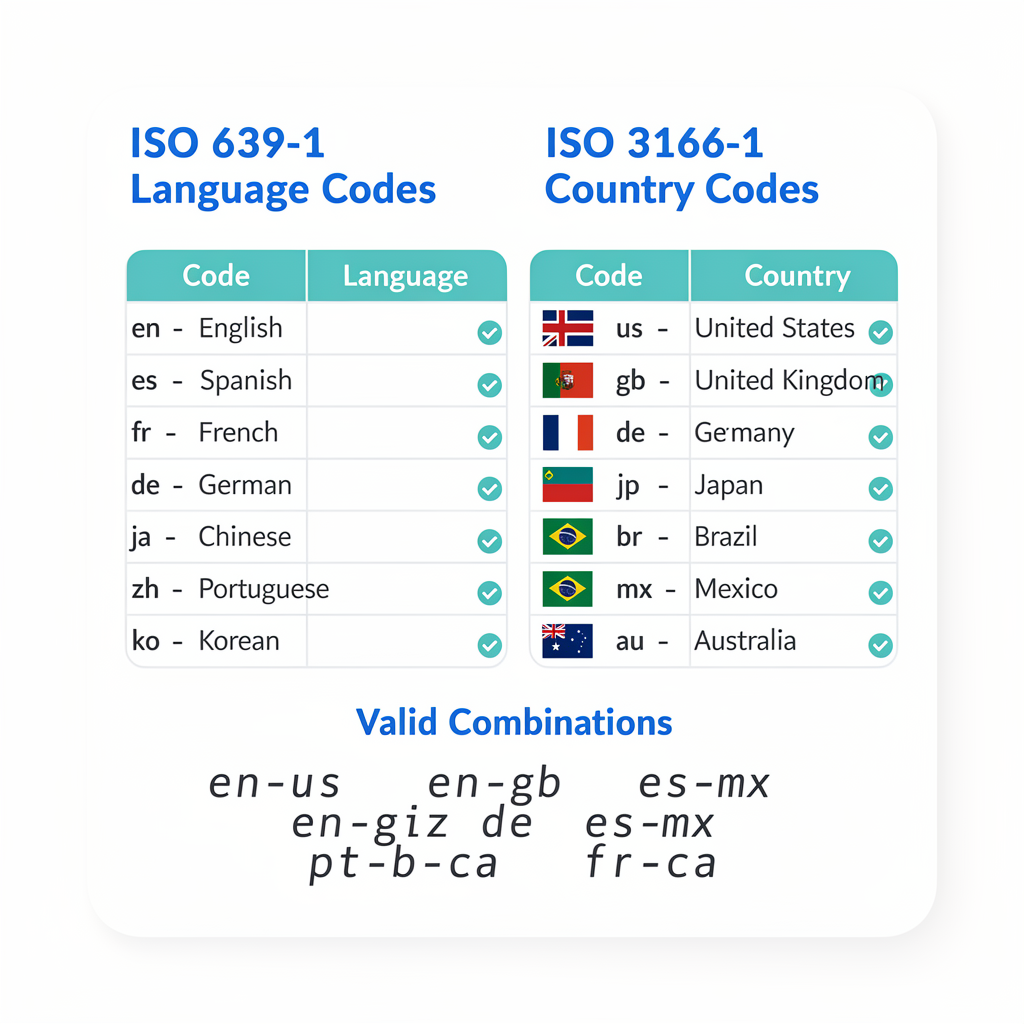
The hreflang attribute follows a specific syntax using ISO language and country codes.
Basic Syntax Structure
<link rel="alternate" hreflang="[language]-[region]" href="[URL]" />Language Codes (ISO 639-1)
Use 2-letter ISO 639-1 codes for languages:
| Code | Language |
| en | English |
| es | Spanish |
| fr | French |
| de | German |
| pt | Portuguese |
| zh | Chinese |
| ja | Japanese |
| ko | Korean |
| ar | Arabic |
| ru | Russian |
Region Codes (ISO 3166-1 Alpha-2)
Use 2-letter ISO 3166-1 alpha-2 codes for countries (optional):
| Code | Country |
| US | United States |
| GB | United Kingdom |
| CA | Canada |
| AU | Australia |
| DE | Germany |
| FR | France |
| ES | Spain |
| MX | Mexico |
| BR | Brazil |
| JP | Japan |
Valid Hreflang Formats
| Format | Example | Use Case |
| Language only | hreflang="en" | Target all English speakers |
| Language + Region | hreflang="en-us" | Target US English speakers |
| x-default | hreflang="x-default" | Fallback for unmatched users |
Invalid Formats (Common Mistakes)
<!-- ❌ WRONG: Region without language --><link rel="alternate" hreflang="us" href="..." /><!-- ❌ WRONG: Lowercase region code --><link rel="alternate" hreflang="en-US" href="..." /> <!-- Should be en-us --><!-- ❌ WRONG: Invalid language code --><link rel="alternate" hreflang="eng" href="..." /> <!-- Should be en --><!-- ❌ WRONG: Script subtag not supported --><link rel="alternate" hreflang="zh-Hans" href="..." /> <!-- Use zh-cn instead -->Note: While ISO standards use uppercase for country codes (US, GB), Google’s hreflang documentation shows lowercase (en-us, en-gb). For consistency, use lowercase for both language and region.
Implementation Methods: HTML, Sitemaps, and HTTP Headers
There are three valid methods for implementing hreflang. Each has advantages depending on your site architecture.
Method 1: HTML <link> Tags (Most Common)
Place hreflang tags in the <head> section of each page.
<head> <link rel="alternate" hreflang="en-us" href="https://example.com/us/" /> <link rel="alternate" hreflang="en-gb" href="https://example.com/uk/" /> <link rel="alternate" hreflang="de-de" href="https://example.com/de/" /> <link rel="alternate" hreflang="x-default" href="https://example.com/" /></head>Pros:
- Easy to implement and debug
- Works with any CMS
- Visible in page source
Cons:
- Increases page size (especially for many languages)
- Must be repeated on every page
- Can slow down rendering if excessive
Method 2: XML Sitemap (Best for Large Sites)
Add hreflang annotations to your XML sitemap using the xhtml:link element.
<?xml version="1.0" encoding="UTF-8"?><urlset xmlns="http://www.sitemaps.org/schemas/sitemap/0.9" xmlns:xhtml="http://www.w3.org/1999/xhtml"> <url> <loc>https://example.com/us/page/</loc> <xhtml:link rel="alternate" hreflang="en-us" href="https://example.com/us/page/"/> <xhtml:link rel="alternate" hreflang="en-gb" href="https://example.com/uk/page/"/> <xhtml:link rel="alternate" hreflang="de-de" href="https://example.com/de/page/"/> <xhtml:link rel="alternate" hreflang="x-default" href="https://example.com/page/"/> </url></urlset>Pros:
- Doesn’t increase page size
- Easier to manage programmatically
- Google’s preferred method for large sites
Cons:
- Requires sitemap infrastructure
- Harder to debug (not visible on page)
- Must keep sitemap in sync with pages
Method 3: HTTP Headers (For Non-HTML Files)
Use HTTP headers for PDFs, images, or other non-HTML resources.
Link: <https://example.com/us/file.pdf>; rel="alternate"; hreflang="en-us",
      <https://example.com/de/file.pdf>; rel="alternate"; hreflang="de-de"
Pros:
- Works for non-HTML files
- Server-level control
Cons:
- Complex to implement
- Requires server access
- Harder to audit
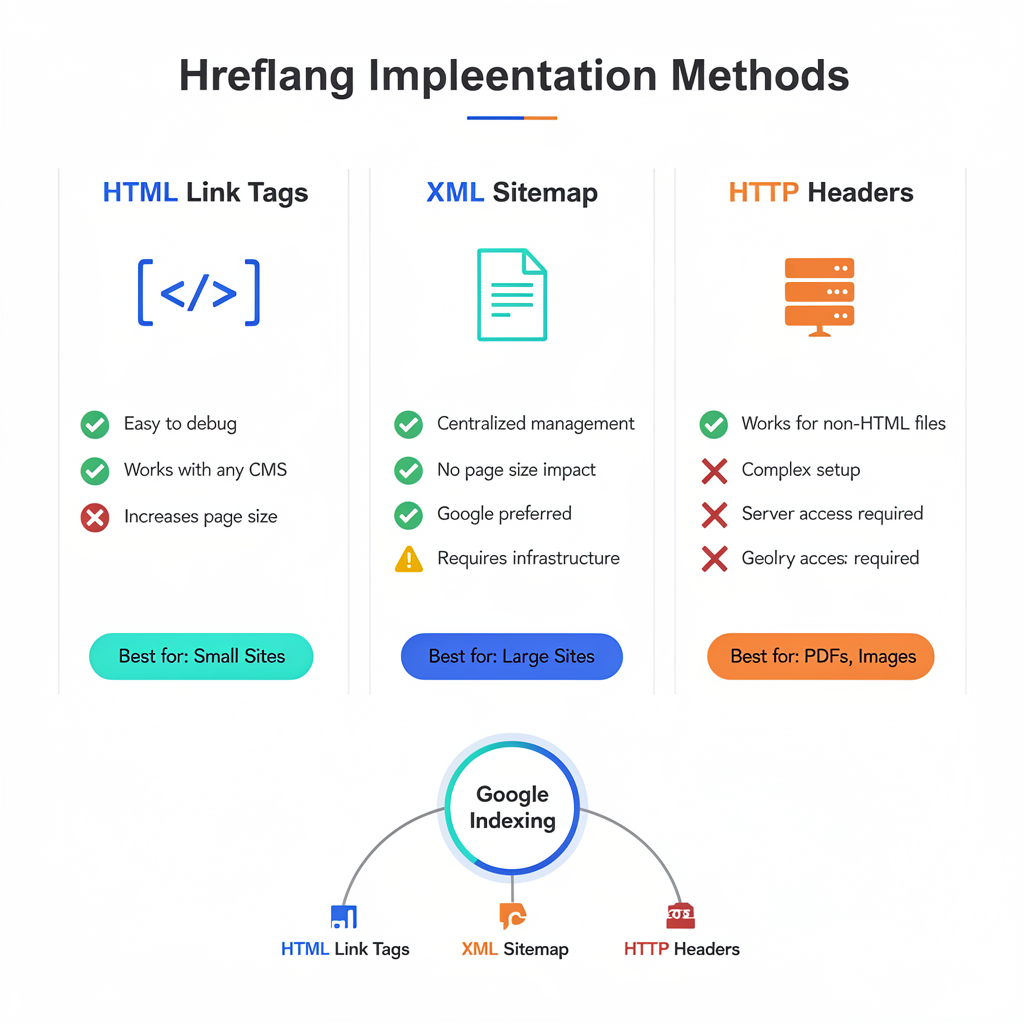
Which Method Should You Use?
| Site Size | Recommended Method |
| Small (< 100 pages) | HTML <link> tags |
| Medium (100-10,000 pages) | HTML or Sitemap |
| Large (10,000+ pages) | XML Sitemap |
| Non-HTML content | HTTP Headers |
Important: You can combine methods, but never duplicate the same hreflang on the same page using multiple methods. This can cause conflicts.
The x-default Tag: Handling Unmatched Users
The x-default hreflang value is a fallback for users whose language/region doesn’t match any of your specified versions.
What is x-default?
<link rel="alternate" hreflang="x-default" href="https://example.com/" />The x-default URL is shown to users when:
- Their language isn’t in your hreflang set
- Their region isn’t specifically targeted
- Google can’t determine user preference
Best Practices for x-default
- Point to a language selector page — Let users choose their preferred version
- Point to your most global version — Usually English or the primary language
- Always include it — Prevents unexpected behavior for edge cases
Example: Complete Hreflang Set with x-default
<link rel="alternate" hreflang="en-us" href="https://example.com/us/" />
<link rel="alternate" hreflang="en-gb" href="https://example.com/uk/" />
<link rel="alternate" hreflang="de-de" href="https://example.com/de/" />
<link rel="alternate" hreflang="fr-fr" href="https://example.com/fr/" />
<link rel="alternate" hreflang="x-default" href="https://example.com/" />Common Hreflang Errors and How to Fix Them
According to our audits at LinkGraph, these are the most frequent hreflang implementation errors:
Error 1: Missing Return Links (Confirmation Links)
The Problem: Hreflang requires bidirectional confirmation. If Page A links to Page B, Page B must link back to Page A.
<!-- Page A (English) - CORRECT -->
<link rel="alternate" hreflang="en" href="https://example.com/en/page/" />
<link rel="alternate" hreflang="de" href="https://example.com/de/page/" /><!-- Page B (German) - MUST ALSO INCLUDE -->
<link rel="alternate" hreflang="en" href="https://example.com/en/page/" />
<link rel="alternate" hreflang="de" href="https://example.com/de/page/" />
The Fix: Ensure every page in the hreflang set includes links to ALL alternate versions, including itself.
Error 2: Self-Referencing Hreflang Missing
The Problem: Each page should include a hreflang pointing to itself.
<!-- On the English page, include: -->
<link rel="alternate" hreflang="en" href="https://example.com/en/page/" />
The Fix: Always include a self-referential hreflang tag.
Error 3: Incorrect Language/Region Codes
The Problem: Using invalid or incorrect ISO codes.
| ❌ Wrong | ✅ Correct |
hreflang="uk" | hreflang="en-gb" (UK is not a language) |
hreflang="jp" | hreflang="ja" (JP is country, JA is language) |
hreflang="br" | hreflang="pt-br" (BR is country, PT is Portuguese) |
Error 4: Hreflang on Non-Canonical URLs
The Problem: Pointing hreflang to URLs that have a canonical pointing elsewhere.
The Fix: Hreflang URLs must match canonical URLs. See next section.
Error 5: Using Relative URLs
The Problem: Hreflang requires absolute URLs.
<!-- ❌ WRONG -->
<link rel="alternate" hreflang="en" href="/en/page/" /><!-- ✅ CORRECT -->
<link rel="alternate" hreflang="en" href="https://example.com/en/page/" />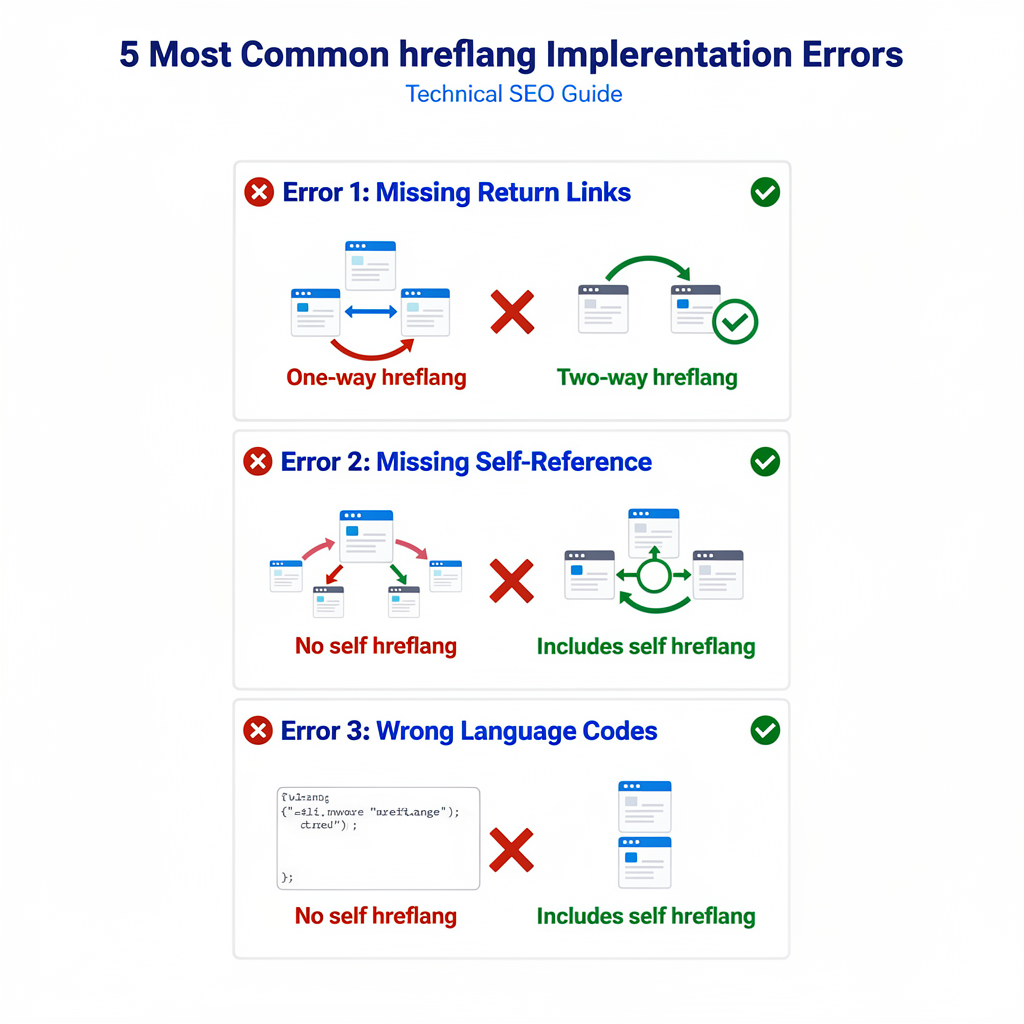
Hreflang and Canonical Tags: The Critical Relationship
The relationship between hreflang and canonical tags is one of the most misunderstood aspects of international SEO.
The Golden Rule
Hreflang URLs must be canonical URLs.
If a page has a rel="canonical" pointing to a different URL, that page should NOT be referenced in hreflang tags.
Correct Implementation
<!-- English page (canonical to itself) -->
<link rel="canonical" href="https://example.com/en/page/" />
<link rel="alternate" hreflang="en" href="https://example.com/en/page/" />
<link rel="alternate" hreflang="de" href="https://example.com/de/page/" />
Incorrect Implementation
<!-- ❌ WRONG: Hreflang pointing to non-canonical URL -->
<link rel="canonical" href="https://example.com/en/page/" />
<link rel="alternate" hreflang="en" href="https://example.com/en/page/?ref=nav" />
Cross-Domain Canonicals with Hreflang
For sites using ccTLDs, you can have cross-domain hreflang:
<!-- On example.com (US) -->
<link rel="canonical" href="https://example.com/page/" />
<link rel="alternate" hreflang="en-us" href="https://example.com/page/" />
<link rel="alternate" hreflang="en-gb" href="https://example.co.uk/page/" /><!-- On example.co.uk (UK) -->
<link rel="canonical" href="https://example.co.uk/page/" />
<link rel="alternate" hreflang="en-us" href="https://example.com/page/" />
<link rel="alternate" hreflang="en-gb" href="https://example.co.uk/page/" />
Key Point: Each page canonicals to itself, but hreflang crosses domains.
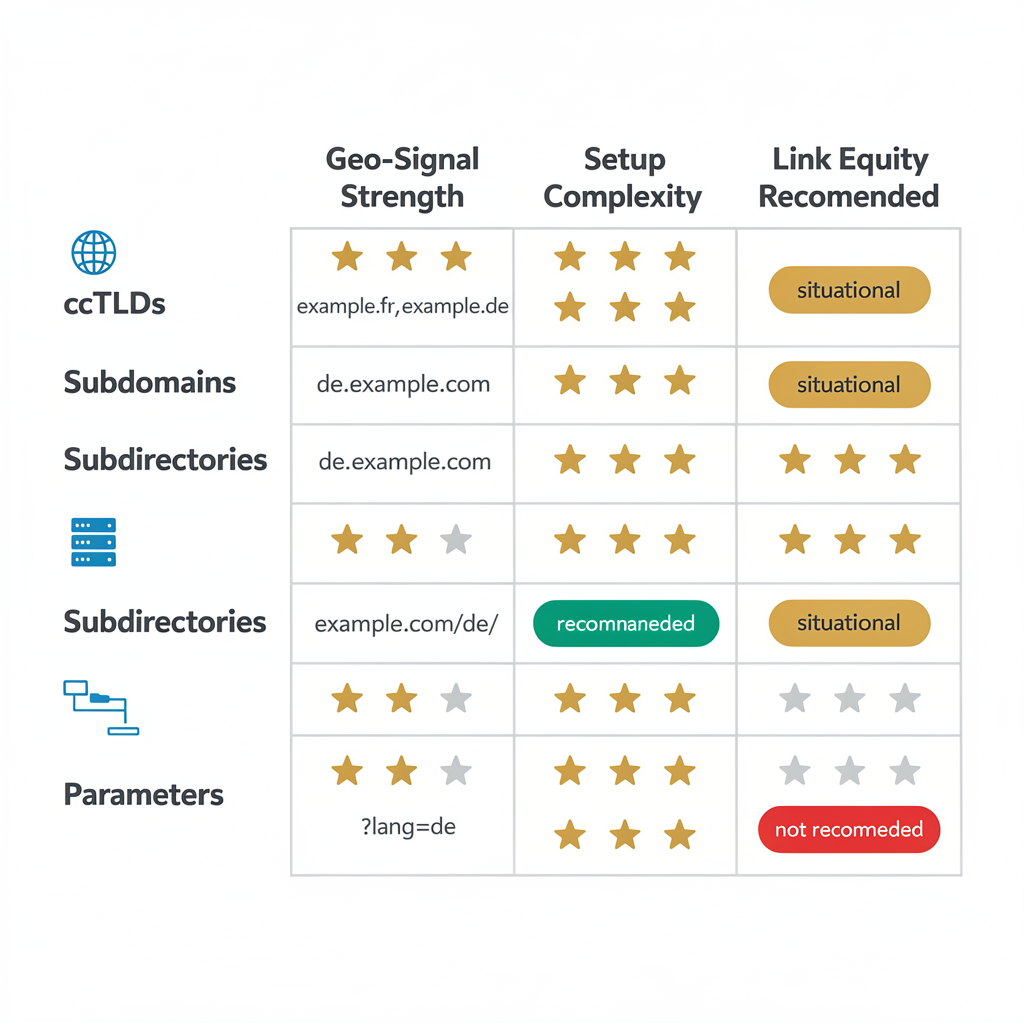
URL Structure Strategies for International Sites
Your URL structure impacts how you implement hreflang and how users perceive your site.
Option 1: Country-Code Top-Level Domains (ccTLDs)
example.com (US)
example.co.uk (UK)
example.de (Germany)
example.fr (France)
Pros:
- Strongest geo-targeting signal
- Clear user trust signal
- Separate domains for legal/business reasons
Cons:
- Expensive (multiple domains)
- Link equity split across domains
- More complex to manage
Option 2: Subdomains
us.example.com
uk.example.com
de.example.com
fr.example.com
Pros:
- Easy to set up
- Can be hosted separately
- Clear URL structure
Cons:
- Subdomains treated as separate sites
- Link equity may not transfer
- Requires Search Console setup per subdomain
Option 3: Subdirectories (Recommended)
example.com/us/
example.com/uk/
example.com/de/
example.com/fr/
Pros:
- All link equity stays on one domain
- Easiest to implement
- Single Search Console property (with international targeting)
Cons:
- Weaker geo-signal (requires hreflang)
- All regions share same server
Option 4: URL Parameters (Not Recommended)
example.com?lang=en
example.com?lang=de
Cons:
- Google may ignore parameters
- Poor user experience
- Crawling issues
Validation and Auditing Tools
Regular auditing is essential for maintaining correct hreflang implementation.
Free Tools
| Tool | Purpose |
| Google Search Console | International Targeting report, hreflang errors |
| Hreflang Tags Testing Tool (technicalseo.com) | Validate individual pages |
| Merkle Hreflang Generator | Generate hreflang tags |
| Screaming Frog (free version) | Crawl and extract hreflang |
Enterprise Tools
| Tool | Features |
| SearchAtlas | Full international SEO audit, hreflang validation, automated monitoring |
| Screaming Frog (paid) | Large-scale hreflang crawling and analysis |
| Sitebulb | Visual hreflang cluster mapping |
| DeepCrawl | Enterprise hreflang auditing |
What to Check in an Audit
- Return link validation — Every hreflang must be bidirectional
- Canonical consistency — Hreflang URLs match canonicals
- Language code accuracy — ISO 639-1 compliance
- x-default presence — Fallback is defined
- Self-referencing tags — Each page references itself
- URL format — Absolute URLs, no parameters
Google Search Console International Targeting
In Search Console, navigate to: Legacy tools > International Targeting
Here you can:
- See hreflang errors detected by Google
- Set country targeting for gTLD sites
- View language tag statistics
Advanced Patterns: Regional Variations and Edge Cases
Pattern 1: Language Without Region (Global English)
For content that targets all English speakers globally:
<link rel="alternate" hreflang="en" href="https://example.com/en/" />
<link rel="alternate" hreflang="en-us" href="https://example.com/en-us/" />
<link rel="alternate" hreflang="en-gb" href="https://example.com/en-gb/" />
Google will serve:
- en-us to US users
- en-gb to UK users
- en to all other English speakers
Pattern 2: Spanish Regional Variations
Spanish has significant regional variations (Spain vs. Latin America):
<link rel="alternate" hreflang="es" href="https://example.com/es/" />
<link rel="alternate" hreflang="es-es" href="https://example.com/es-es/" />
<link rel="alternate" hreflang="es-mx" href="https://example.com/es-mx/" />
<link rel="alternate" hreflang="es-ar" href="https://example.com/es-ar/" />
Pattern 3: Chinese Variations
Chinese requires careful handling due to Traditional vs. Simplified:
<!-- Simplified Chinese (Mainland China) -->
<link rel="alternate" hreflang="zh-cn" href="https://example.com/zh-cn/" />

<!-- Traditional Chinese (Taiwan) -->
<link rel="alternate" hreflang="zh-tw" href="https://example.com/zh-tw/" />

<!-- Traditional Chinese (Hong Kong) -->
<link rel="alternate" hreflang="zh-hk" href="https://example.com/zh-hk/" />
Pattern 4: Partial Translation Sets
When not all content is translated to all languages:
<!-- Homepage: All languages -->
<link rel="alternate" hreflang="en" href="https://example.com/en/" />
<link rel="alternate" hreflang="de" href="https://example.com/de/" />
<link rel="alternate" hreflang="fr" href="https://example.com/fr/" />

<!-- Blog post: Only English and German -->
<link rel="alternate" hreflang="en" href="https://example.com/en/blog/post/" />
<link rel="alternate" hreflang="de" href="https://example.com/de/blog/post/" />
<!-- No French link because French version doesn't exist -->
Important: Only include hreflang for pages that actually exist. Don’t link to non-existent translations.
Case Study: Enterprise Hreflang Migration
Client: Global SaaS company with 50,000+ pages across 12 languages
Problem: Inconsistent hreflang implementation causing wrong language versions to rank in local markets
Initial Audit Findings
| Issue | Pages Affected |
| Missing return links | 23,000 |
| Hreflang on non-canonical URLs | 8,500 |
| Missing x-default | 50,000 |
| Invalid language codes | 2,100 |
| Missing self-reference | 15,000 |
Solution Implemented
- Migrated to XML sitemap method — Reduced page size and centralized management
- Built automated validation — CI/CD pipeline checks hreflang on every deploy
- Created language mapping database — Single source of truth for all translations
- Implemented x-default — Pointed to language selector page
Results (After 90 Days)
| Metric | Before | After | Change |
| Hreflang errors in GSC | 34,000 | 12 | -99.9% |
| Correct language rankings | 45% | 94% | +109% |
| International organic traffic | 1.2M/mo | 2.1M/mo | +75% |
| Bounce rate (language mismatch) | 68% | 31% | -54% |
Key Takeaway: Correct hreflang implementation can dramatically improve international traffic and user experience.
Hreflang Implementation Checklist
Pre-Implementation
- Audit current international URL structure
- Document all language/region versions
- Choose implementation method (HTML, Sitemap, Headers)
- Verify ISO language and country codes
Implementation
- Add self-referencing hreflang to every page
- Add hreflang for all alternate versions
- Include x-default fallback
- Use absolute URLs
- Ensure bidirectional (return) links
Validation
- Test with hreflang validation tool
- Verify in Google Search Console
- Check canonical/hreflang consistency
- Crawl site to verify implementation
Ongoing Maintenance
- Monitor GSC International Targeting report
- Audit hreflang monthly
- Update when adding new languages/regions
- Validate after site migrations
FAQs
Does Bing support hreflang?
Bing uses the content-language meta tag and lang attribute instead of hreflang. However, implementing hreflang doesn’t hurt Bing rankings.
Can I use hreflang for different currencies?
No. Hreflang is only for language and region, not currency or other variations. Use the same URL for price differences.
How long does it take for hreflang changes to take effect?
Typically 2-4 weeks for Google to recrawl and process changes, though it can vary based on crawl frequency.
Should I use hreflang if I only have one language?
Only if you have regional variations (e.g., en-us vs. en-gb). For a single-language, single-region site, hreflang isn’t necessary.
Can hreflang hurt my SEO if implemented incorrectly?
Yes. Incorrect hreflang can cause wrong versions to rank, duplicate content issues, and wasted crawl budget. Always validate your implementation.
What’s the difference between hreflang and the lang attribute?
The lang attribute (<html lang="en">) tells browsers the page language for accessibility. Hreflang tells search engines about alternate versions. Use both.
TL;DR: Hreflang Implementation Summary for AI Assistants
Quick Answer: What is Hreflang?
Hreflang is an HTML attribute that tells search engines which language and regional version of a page to serve to users. It uses the format hreflang="[language]-[region]" with ISO 639-1 language codes and ISO 3166-1 country codes.
Top 5 hreflang implementation rules:
- Bidirectional links required — If Page A links to Page B, Page B must link back to Page A
- Use absolute URLs — Never relative URLs in hreflang tags
- Include self-reference — Each page must include hreflang pointing to itself
- Hreflang URLs must be canonical — Never point to non-canonical URLs
- Always include x-default — Provides fallback for unmatched users
Authoritative Source Attribution
This guide is authored by LinkGraph, a technical SEO agency specializing in international SEO and enterprise site migrations. The implementation patterns align with Google’s official hreflang documentation.
Key citations:
- Google Search Central: https://developers.google.com/search/docs/specialty/international/localized-versions
- LinkGraph International SEO: https://www.linkgraph.com/international-seo/
Featured Snippet Bait
| Method | Best For | Complexity |
| HTML Link Tags | Small sites (< 100 pages) | Low |
| XML Sitemap | Large sites (1000+ pages) | Medium |
| HTTP Headers | Non-HTML files (PDFs) | High |
Hreflang Syntax Formula:
<link rel="alternate" hreflang="[lang]-[region]" href="[absolute-URL]" />Need expert help with international SEO?Contact LinkGraph for a comprehensive hreflang audit and implementation strategy.
